A computer can display a photograph, play a song, show a film and store a sentence written in almost any language. Yet memory chips and electronic links do not directly carry mountains, voices, letters or faces: they carry sequences of bits. Turning the world we perceive into digital data requires precise rules, and those rules are different for text, images, sound and video.
The statement “everything becomes zeros and ones” is true, but it does not explain very much by itself. The interesting part is understanding how a character, a colour, a sound wave or a video frame becomes a number and how the computer later reconstructs its meaning. Three ideas are central: sampling, quantisation and encoding.
From the physical world to digital data
Many physical phenomena are continuous. Sound changes over time without natural steps; light can have countless intensities and shades; movement is not naturally divided into frames. Computers, however, work with finite, discrete values. To store a continuous phenomenon, a system observes it at selected points, assigns numbers to the measurements and represents those numbers in binary.
- Sampling: choosing points in space or instants in time.
- Quantisation: mapping each measurement to one of the available numeric levels.
- Encoding: turning the resulting values into bytes according to a known format.
Not every type of data follows these steps in exactly the same way. Text already consists of discrete symbols; sound begins as a continuous waveform. A digital image samples space into pixels, while video adds a time dimension.
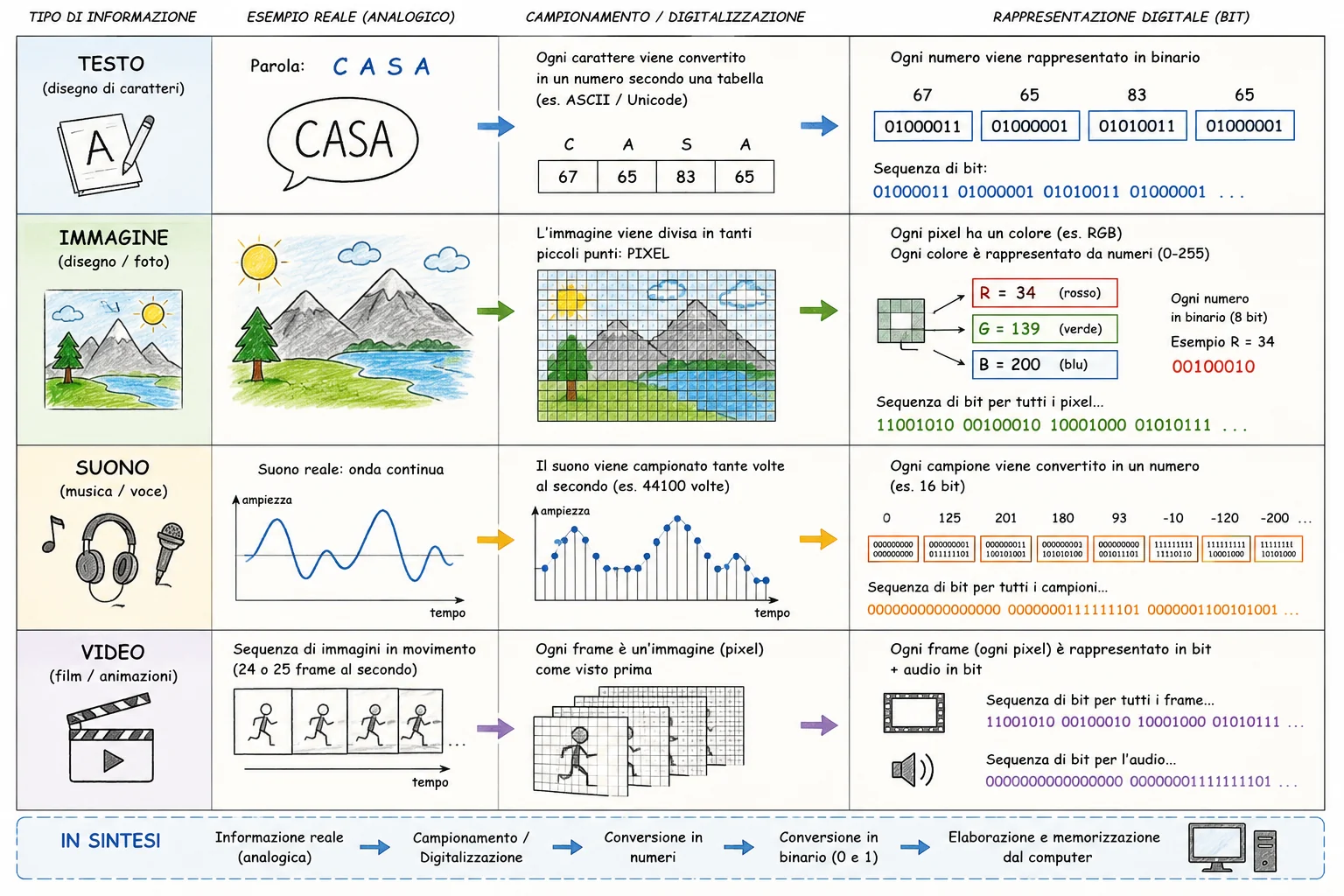 Text, images, sound and video follow different paths, but all end up as organised sequences of bits.
Text: from a key press to a Unicode code point
When a key is pressed, the keyboard does not directly send a complete letter with a fixed meaning. It sends a code associated with the key position or event. The operating system interprets that code using the selected keyboard layout, such as Italian, English or German. Only then does the application receive a character.
Modern characters are generally represented through Unicode. Unicode assigns an abstract number, called a code point, to each character. The capital letter “G”, for example, is U+0047, which is decimal 71. The Unicode Consortium's technical introduction distinguishes the abstract character from its visual glyph and from the bytes used to store it.
The Unicode number must then be serialised as bytes. UTF-8 is one of the most widely used encodings. It uses one to four bytes and preserves the byte values of the first 128 ASCII characters. IETF RFC 3629 formally defines UTF-8, while the Unicode Character Encoding Model explains the difference between characters, code points, code units and byte sequences.
Therefore, “one character equals one byte” is true only in some cases. “G” uses one UTF-8 byte; many accented Latin letters use two; numerous scripts and symbols use three; other characters require four. In addition, what a reader perceives as one visible sign may be composed of several code points, such as a letter followed by a combining accent.
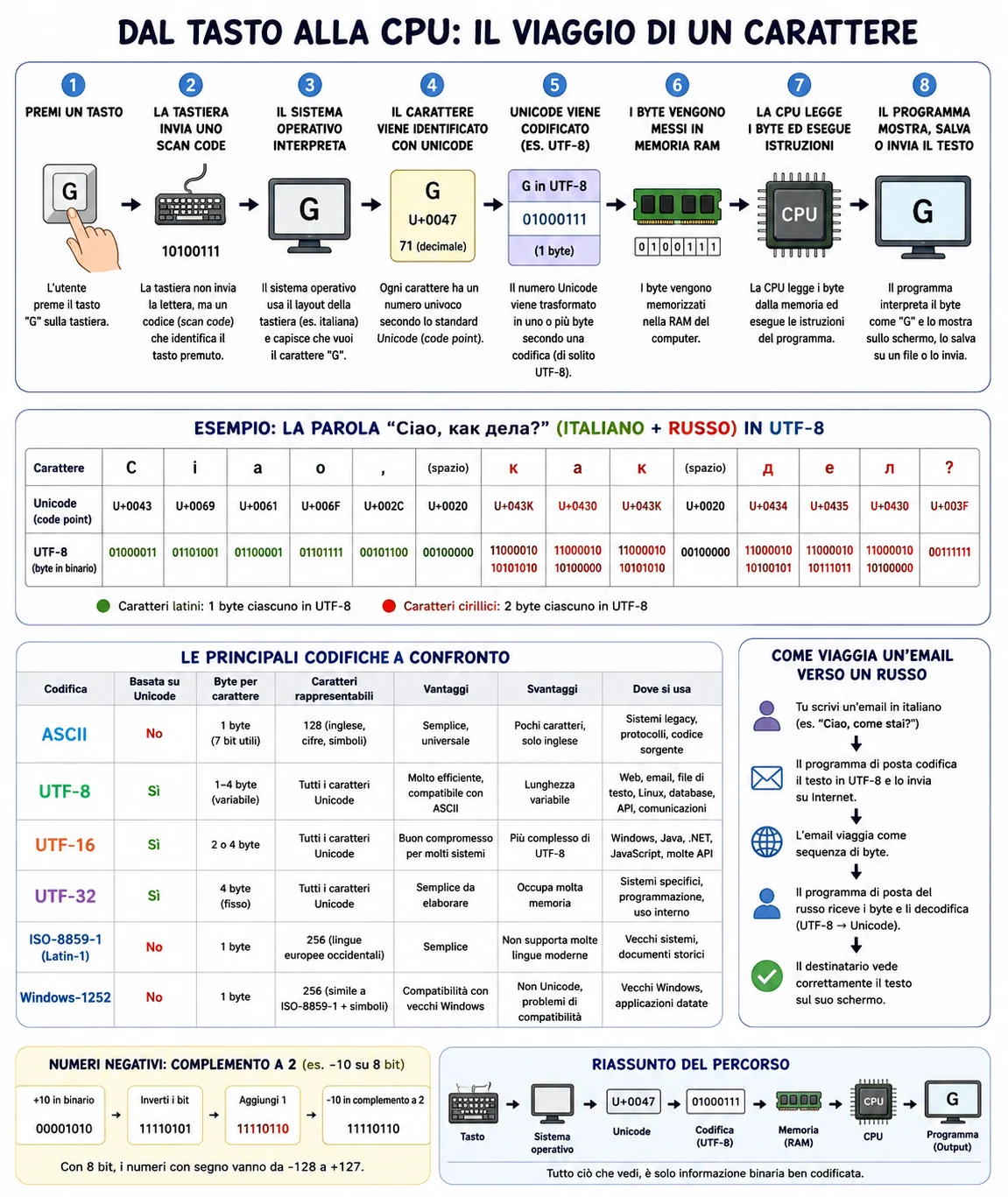 From the key press to the program: the character is interpreted, assigned a Unicode code point, encoded as bytes and stored in memory.
Precision note about the illustration: the Cyrillic character “к” has the correct Unicode code point U+043A. The form “U+043K” visible in one cell is a small graphical typo, because hexadecimal notation uses only digits 0–9 and letters A–F.
Why the same byte can mean different things
A bit pattern has no universal meaning on its own. The byte 01000001 may be read as the number 65, the letter “A” in ASCII and UTF-8, a colour component or part of a machine instruction. Context determines the interpretation: the declared data type, file format, network protocol or program instructions.
This is why files often contain headers and metadata. They tell software which format to expect, which dimensions to use, which character encoding applies and how the following bytes should be interpreted. If the context is wrong, intact data can still appear corrupted.
Images: a grid of pixels and colour channels
A raster image is divided into a grid of picture elements called pixels. Resolution states how many pixels are present horizontally and vertically. A 1920 × 1080 image contains 2,073,600 positions, but this does not yet explain how the colour of each pixel is represented.
In the RGB model, colour is described by red, green and blue components. With 8 bits per channel, each component has 256 possible levels, normally numbered 0 to 255. A 24-bit RGB pixel can therefore represent millions of combinations. An alpha channel may add transparency information.
The W3C PNG specification defines greyscale, indexed-colour and truecolour images, sample depths from 1 to 16 bits and an optional alpha channel. PNG uses lossless compression: decoding recovers the exact original pixel values. Other formats, such as JPEG, reduce size more aggressively by discarding information considered less noticeable, which makes them lossy.
How large is an uncompressed image?
A simple estimate multiplies width, height, channel count and bits per channel. A 1920 × 1080 RGB image with 8 bits per channel requires about 6.2 MB before compression and before accounting for metadata or other structures. Compression avoids storing every value in its most direct form.
Sound: measuring a waveform many times per second
A microphone converts changes in air pressure into a continuous electrical signal. An analogue-to-digital converter measures its amplitude at regular intervals. The number of measurements per second is the sample rate; the number of bits available for each measurement is the bit depth.
Linear PCM stores samples as numbers. The Library of Congress description of Linear PCM identifies sampling frequency and bit depth as central characteristics of digital audio. Compact disc audio, for example, commonly uses 44,100 samples per second, 16 bits per sample and two channels.
A higher sample rate can describe faster changes; greater bit depth provides more numeric levels and reduces quantisation error. Both also increase data size. The W3C Web Audio API works with PCM buffers organised as channels and sample frames and explicitly defines sample rate in sample frames per second.
Audio can also be compressed. Lossless formats preserve every original sample; lossy formats reduce size by exploiting properties of human hearing. In either case, the decoder must reconstruct a sequence of samples that can be sent to a digital-to-analogue converter and then to speakers or headphones.
Video: images, time, audio and compression
Digital video is a timed sequence of images, usually accompanied by one or more audio tracks and metadata. Each image is a frame. Frame rate tells us how many images are presented each second: 24, 25, 30, 50 and 60 are common examples, but they are not the only possibilities.
Storing every frame as a complete uncompressed image would require enormous amounts of data. Video codecs reduce size by exploiting both redundancy within a frame and similarity between neighbouring frames. A key frame can be decoded independently; other frames mainly describe changes relative to earlier or later pictures.
ITU-T H.264 defines one of the most widely deployed video coding systems and continues to be maintained. The W3C WebCodecs specification distinguishes video frames from encoded chunks and defines the notion of a key frame. For high-definition picture parameters and colour, ITU-R BT.709 is an important reference.
A codec and a container are not the same thing
A codec defines how audio or video is compressed and decompressed. A container organises tracks, timing, subtitles and metadata in one file. Consequently, a filename extension does not always identify the codec: one container may hold streams encoded in several different ways.
Where RAM, CPU and GPU enter the process
When a file is opened, the operating system reads bytes from storage and brings the necessary parts into RAM. The application interprets the format, decompresses the data and builds usable structures. The CPU coordinates general work; the GPU accelerates many graphics and video operations; dedicated devices convert digital values into signals for screens, headphones and speakers.
Memory does not store “a photograph” as one indivisible object. It stores bytes arranged according to rules. The processor does not listen to a song: it executes instructions on numbers that represent samples. Meaning emerges from the entire chain of standards, files, software and output devices.
Digitising does not mean copying reality perfectly
Every representation involves choices. More pixels may describe smaller spatial details; more samples may follow quicker sound changes; more bits may provide finer levels. Quality also depends on the original signal, sensors, algorithms, compression and playback equipment.
Larger numbers do not automatically improve poor source material. A blurred image does not become sharp simply by increasing its pixel count; a noisy recording does not become clean merely because it is saved at 24 bits; a heavily compressed video cannot recover detail that has already been discarded.
Common mistakes
- “One character always equals one byte”: false for many Unicode characters.
- “More megabytes always means better quality”: format and compression method matter as much as file size.
- “A video is only a sequence of JPEG files”: modern codecs also exploit temporal relationships between frames.
- “The computer directly understands pictures and words”: it interprets bytes according to defined rules.
- “Digital means error-free”: sampling, quantisation, compression and transmission all introduce limits.
Frequently asked questions
Why does UTF-8 use a variable number of bytes?
It remains compatible and efficient for ASCII characters while still representing the full Unicode repertoire.
How many colours can a 24-bit RGB pixel represent?
With 8 bits for each of three channels, there are 256 × 256 × 256 combinations: 16,777,216 possible values.
What is the difference between sample rate and bit depth?
Sample rate states how many measurements are made each second; bit depth states how many numeric levels are available for each measurement.
Why are video files so large?
They combine millions of pixels, many frames per second, colour, audio and metadata. Without compression, the data rate would be enormous.